The small shop is where mobile money either becomes everyday money or stays a remittance tool. When customers can pay a kiosk, a market stall, a pharmacy or a café straight from their wallet, the money stays digital, merchants stop handling so much cash, and the whole system becomes more valuable. This guide compares the three main ways merchants get paid by mobile money (till numbers, QR codes and prompt-to-pay), explains how each works, and covers settlement, fees, fraud and what merchants actually need from the app.
Why merchant payments matter so much
In a wallet that is used mostly for transfers, money arrives and is cashed out almost immediately. Every cash-out costs the provider agent commission and costs the customer a fee. When money can be spent where it lands, three things happen:
- Customers keep balances in the wallet, which increases activity and lowers the cost of serving them.
- Merchants reduce cash risk: theft, counterfeit notes, shortages in the till and trips to the bank.
- The ecosystem compounds: merchants pay suppliers from the wallet, suppliers pay staff, and liquidity recycles digitally.
That is why mature mobile money markets see merchant payments as the growth engine after transfers.
The three ways a merchant gets paid
| Method | Who starts it | Customer needs | Best for |
|---|---|---|---|
| Till or merchant number | Customer enters the merchant's number and the amount | Any phone (USSD or app) | Every shop, including basic-phone customers |
| QR code | Customer scans the merchant's code | A smartphone with the wallet app | Fast, error-free checkout; busy counters |
| Prompt-to-pay (request) | Merchant sends a request to the customer's phone | Any phone that can receive a PIN prompt | Counters, deliveries, restaurants, online checkout |
Till numbers
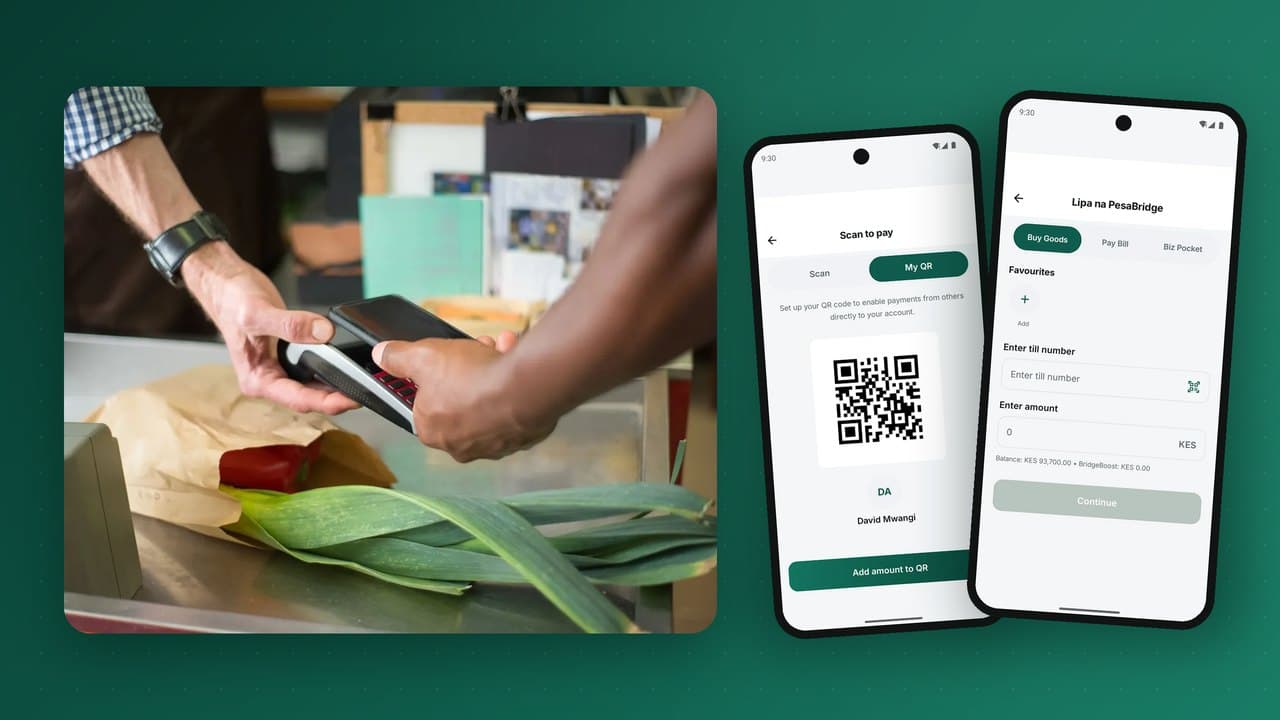
Each merchant gets a short number. The customer opens "Buy Goods" or "Pay Merchant", enters the till number and amount, sees the merchant's registered name, and confirms with their PIN. The merchant gets an SMS or in-app notification. Tills work on every phone, which is why they became the backbone of merchant payments in early markets. The weaknesses: customers mistype numbers or amounts, and merchants must check that the payment really arrived.
QR codes
The merchant displays a code, either printed (static) or shown on a screen with the amount already included (dynamic). The customer scans it in the wallet app, which fills in the merchant and, for dynamic codes, the amount. Confirmation is by PIN or biometrics. QR removes typing errors and speeds up checkout, but requires a smartphone. National QR standards based on the EMVCo specification let one code accept payments from any participating wallet or bank app; see interoperability.
Prompt-to-pay
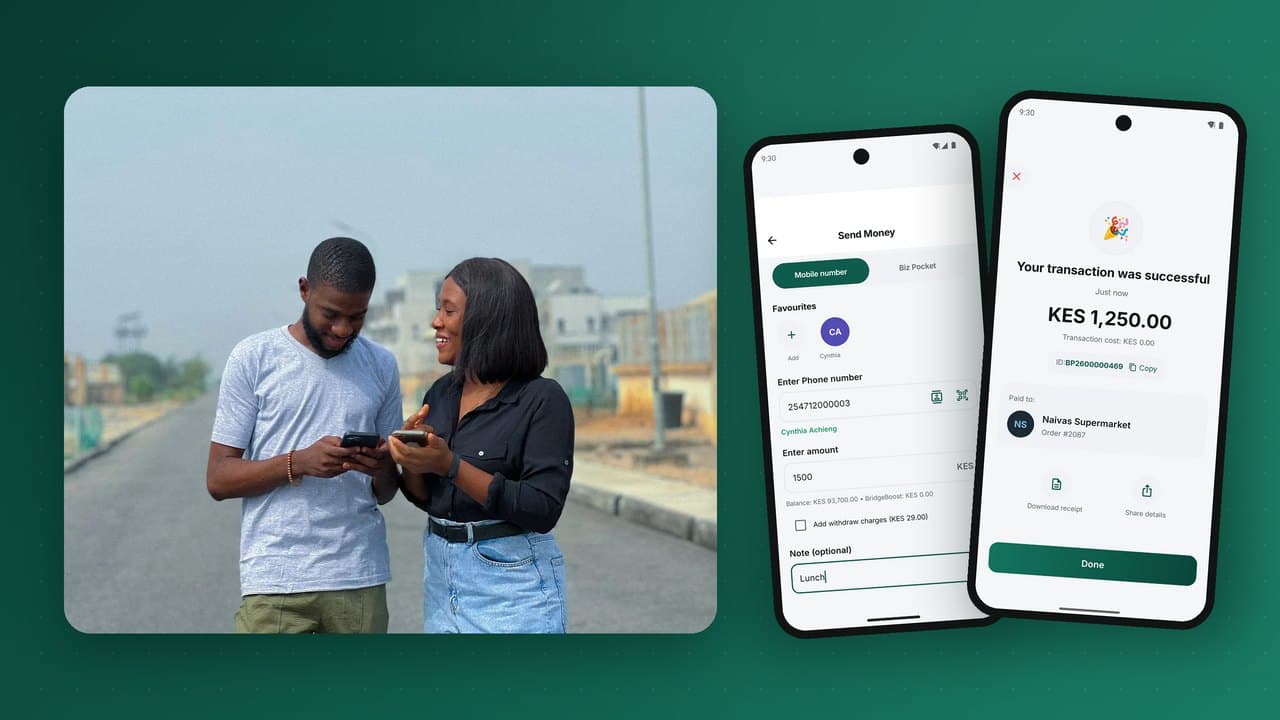
The merchant enters the customer's phone number and the amount on the merchant app, a POS or their own system through an API. A payment request pops up on the customer's phone showing who is asking and how much; the customer approves with their PIN. The merchant sees the confirmation instantly. Prompt-to-pay is the most merchant-friendly method, because the merchant controls the amount and knows exactly which sale was paid. Our deep dive on how prompt-to-pay works covers the engineering behind it.
Static vs. dynamic QR codes
A static QR identifies the merchant only; the customer types the amount. It costs nothing to print, never changes and suits small stalls. A dynamic QR is generated for each sale and includes the amount and often an order reference; the customer only confirms. It needs a screen (a phone, tablet or POS), but it eliminates wrong amounts and links the payment to a specific order automatically. Many merchants use both: a printed code on the counter and dynamic codes at a busy till.
What happens after the customer pays: settlement
For a merchant, being paid means having money they can use. Settlement options include:
- Instant, in-wallet: the payment lands in the merchant's wallet balance immediately, ready to pay suppliers, withdraw or transfer.
- Sweep to bank: the balance is transferred to the merchant's bank account daily or on demand.
- Settle to an agent: small merchants can convert their balance to cash through an agent, or act as agents themselves.
- Split settlement: for platforms and franchises, one payment is split between the brand, the outlet and a service provider automatically.
Whatever the model, the merchant needs a statement they can trust: every payment, fee and settlement, with references that match their own sales records. This is where a double-entry ledger and automatic reconciliation matter to a shopkeeper as much as to the regulator.
Merchant fees: pricing that beats cash
Merchants compare wallet fees with the true cost of cash (theft, counterfeits, bank trips, time counting) and with card acceptance. Common approaches:
- Percentage fee with a cap, lower than typical card acceptance.
- Free for small transactions to win micro-merchants, with fees on larger ones.
- Customer-paid fees for some bill payments, merchant-paid for goods.
- Free settlement to wallet, with a small fee for bank sweeps.
Whatever you choose, show fees clearly in the merchant app and on statements. Surprise deductions lose merchants quickly.
What a merchant app must do
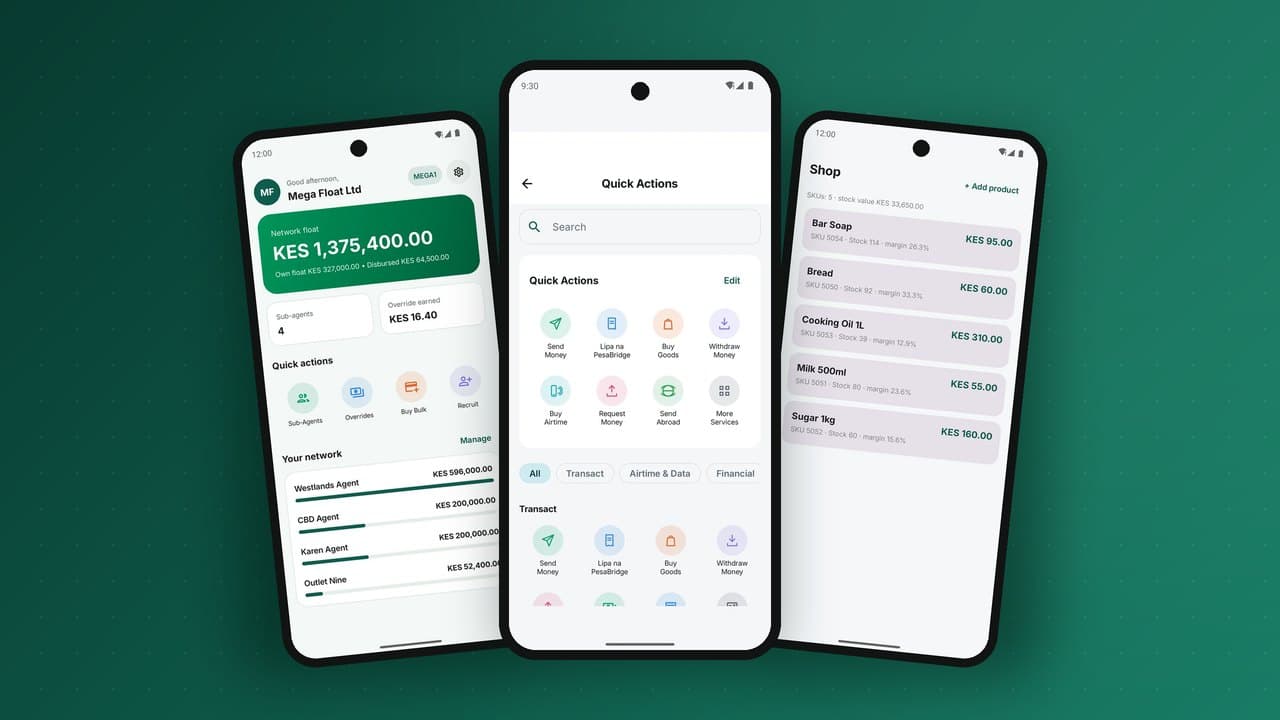
For many small businesses the merchant app becomes their till, their POS and their back office. The features that matter most:
- Live till balance and today's collections at a glance.
- Request money (prompt-to-pay) and show a dynamic QR for any amount.
- Point of sale with a product list or barcode scanning, and stock that updates on every sale.
- Refunds and reversals with reasons and approvals.
- Staff operators with their own logins and limits, so the owner can see who took which payment.
- End-of-day Z-report summarising sales, payments by method, refunds and settlement.
- Settlement to wallet, agent or bank, on demand or scheduled.
- Supplier payments directly from the till balance.
A merchant who can close the day in one tap, without a spreadsheet at midnight, will not go back to cash.
Integrating with bigger merchants: API and plugins
Supermarkets, e-commerce stores, schools, utilities and platforms need payments inside their own systems. They typically integrate through:
- A collections API to send prompts, check status and receive confirmations.
- Signed webhooks that notify the merchant's system of each payment, verifiable so no one can fake a "paid" message.
- Bill-reference validation so customers paying a school or utility cannot pay into a non-existent account.
- E-commerce plugins for common store platforms.
- POS integrations so the cashier's system sends the prompt and marks the sale paid automatically.
Fraud and disputes at the merchant
The most common merchant-side problems and how to design against them:
- Fake payment SMS: fraudsters show a forged confirmation message. Counter: merchants trust only the notification inside the merchant app or the balance, never an SMS shown by the customer.
- Wrong-amount payments: customers pay less than the price. Counter: dynamic QR and prompt-to-pay, where the merchant sets the amount.
- Payments to the wrong till: Counter: show the merchant's registered name before the customer confirms.
- Refund abuse: Counter: refunds only against an original payment, with operator approval and limits.
- Staff skimming: Counter: operator logins, per-operator reports and owner notifications.
More in our fraud prevention guide.
Onboarding merchants at scale
Growing merchant acceptance is a distribution exercise. Tactics that work:
- Self-service sign-up in the merchant app, with KYC documents routed to compliance for approval.
- Tiered merchant KYC: micro-merchants start with a personal ID and low limits; registered businesses unlock higher ones.
- Agents as recruiters, paid for merchants who become active.
- Printed QR kits and counter stickers that make acceptance visible.
- Customer incentives at new merchants, such as cashback on the first payments.
- Clusters: sign up whole markets, streets or supply chains rather than scattered shops, so customers can spend where they live.
Which method suits which merchant
| Merchant type | Best primary method | Why |
|---|---|---|
| Market stall, kiosk | Till number plus a printed static QR | No hardware; works for basic-phone and smartphone customers |
| Small shop with a phone at the counter | Prompt-to-pay from the merchant app | Merchant sets the amount; instant confirmation on the merchant's phone |
| Supermarket or pharmacy chain | Prompt-to-pay or dynamic QR from the POS | Integrated with the till; each payment linked to a receipt |
| Restaurant or café | Dynamic QR on the bill, or prompt at the table | Exact amount; no card machine to carry around |
| Delivery and field sales | Prompt-to-pay from the rider's phone | Customer pays on delivery without cash |
| Utility, school, landlord | Pay Bill with account reference, plus API | Payments matched to the right account automatically |
| Online store | API checkout with prompt-to-pay or redirect | Order marked paid by a signed webhook |
A shopkeeper's day, before and after
Take a small general shop in a busy estate. Before digital payments, the owner opens with a float of coins and small notes, spends part of the day sending customers away for lack of change, keeps the day's takings in a drawer, and closes by counting cash by hand, often finding it does not match. Twice a week they close early to take cash to the bank, and they worry about the walk home.
After adopting a merchant app, a typical day looks different. Customers pay by prompt or QR at the counter, and each payment appears on the owner's phone with the amount and the customer's name. Change stops being a problem. When a supplier's van arrives, the owner pays the driver from the till balance. The owner's spouse, who covers the afternoon shift, has their own operator login, so the owner can see exactly what was taken on each shift. At closing, one tap produces the day's Z-report: sales by payment method, refunds, fees and the balance to settle. The owner moves part of the balance to savings and sweeps the rest to the bank from the app, without leaving the shop.
That is the product merchants are really buying: not a payment method, but a calmer, safer, more controlled business.
A 90-day plan to launch merchant acceptance in a market
Days 1 to 30: seed a cluster
- Pick one dense area: a market, a high street or an estate where many of your customers live.
- Sign up the 50 to 100 merchants people use every day: food, pharmacy, transport, airtime, hardware.
- Give each a QR kit, a till number and a 15-minute training on the merchant app.
- Make acceptance visible with counter stickers and signs.
Days 31 to 60: drive usage
- Run customer promotions at participating merchants: small cashback on the first few payments.
- Encourage merchants to pay suppliers from the wallet so money keeps moving digitally.
- Collect feedback weekly; fix friction points quickly.
Days 61 to 90: expand and prove
- Measure payments per merchant per week and the share of merchants active weekly.
- Compare cash-out rates in the cluster with other areas; lower cash-out shows the loop is working.
- Replicate the playbook in the next two or three clusters.
Working with patchy connectivity
Many merchants trade where data connections are unreliable. Payment methods behave differently when networks are weak:
- Till numbers over USSD work without mobile data on the customer's side, which is why they remain essential.
- Prompt-to-pay needs the merchant's device to reach the platform, but the customer can approve on any phone.
- QR payments need the customer's app to be online.
- Confirmation should always come from the platform, by notification or SMS to the merchant, never from the customer's screen.
Whatever the connection, a sale should never be marked paid without a payment confirmed by the platform.
Merchant KYC tiers at a glance
| Tier | Typical merchant | Documents | Limits |
|---|---|---|---|
| Micro | Stalls, hawkers, sole traders | Personal ID, photo, location | Low daily and monthly receipts |
| Small business | Registered shops and services | Business registration, owner ID, premises details | Higher receipts, bank settlement |
| Corporate | Chains, utilities, platforms | Company documents, directors, beneficial owners, contracts | High volumes, API access, multiple outlets |
Tiering lets micro-merchants start accepting payments quickly while keeping higher-risk activity behind stronger checks, the same principle as tiered KYC for customers.
Common mistakes in merchant payments
- Accepting screenshots as proof. Fake payment messages are the most common merchant fraud. Only the platform's confirmation counts.
- Slow settlement. Merchants who wait days for their money go back to cash.
- High fees on small tickets. A fee that is trivial on a large purchase can wipe out the margin on a cup of tea.
- No refund path. Merchants need a simple, controlled way to refund a customer.
Key terms in merchant payments
| Term | Meaning |
|---|---|
| Till number | A short number identifying a merchant, which customers enter on USSD or in the app to pay. |
| Static QR | A printed code that identifies the merchant; the customer enters the amount. |
| Dynamic QR | A code generated for one sale, containing the amount and a reference. |
| Prompt-to-pay | The merchant sends a payment request that appears on the customer's phone for approval with their PIN. |
| MDR | Merchant discount rate: the fee a merchant pays on each payment received. |
| Settlement | Moving the merchant's received funds to their bank account or main wallet. |
| Chargeback | A card-network process for disputed payments; wallet schemes usually use refunds and complaints instead. |
| Acquirer | The institution that signs up merchants and provides their acceptance services. |
Frequently asked questions
What is the difference between Pay Bill and Buy Goods?
Pay Bill pays a business number with an account reference, used by utilities, schools and billers. Buy Goods pays a till number, used by shops for purchases.
Do customers need a smartphone to pay merchants?
No. Till numbers and prompt-to-pay work on basic phones. QR codes need a smartphone.
How fast does the merchant receive the money?
The payment is usually in the merchant's wallet balance instantly. Moving it to a bank account depends on the settlement schedule.
Can one QR code accept payments from different wallets?
Yes, where a national QR standard and interoperability are in place.
Is a merchant app a replacement for a POS?
For most small businesses, yes: it can sell from a product list, take payment, track stock, manage staff and produce end-of-day reports.
PesaBridge gives merchants a native business app that is a till, a POS and a back office in one: prompt-to-pay, QR, product catalogue and stock, staff operators, refunds, Z-reports and settlement to wallet, agent or bank, plus an API and signed webhooks for larger merchants. See the merchant platform or request test access.